
Download PC Startup Master – startup manager, startup optimization, PC performance, Windows utility, system booster
Overview
PC Startup Master is a Windows-based utility designed to enhance system performance by streamlining the startup process. The app targets users seeking to improve their computer’s boot speed and overall responsiveness by managing startup programs, services, and scheduled tasks. By allowing users to selectively enable or disable these components, it reduces system load during startup, leading to faster access to the desktop environment. This is particularly beneficial for users with older or resource-constrained systems where boot times can be significantly prolonged.
The tool caters to both beginners and experienced users, thanks to its user-friendly interface that simplifies complex system-level configurations. Its core purpose lies in optimizing system performance while maintaining stability and security. Real-world use cases include preparing a work computer for quick daily use, troubleshooting slow boot issues, or securing a system against malicious software that relies on startup persistence.
As a productivity-focused utility, PC Startup Master plays a meaningful role in the Windows ecosystem by providing a centralized solution for startup management. The developer, PC Startup Master, did not provide additional technical or company background details. However, the app’s release date of January 3, 2024, indicates it is a recent entry in the system optimization space, suggesting it may incorporate modern Windows compatibility and design principles. The app’s compact size of 4.5 MB reflects its lightweight nature, making it efficient and easy to install.
Key Features & Functionality
- Faster Startup: The app improves boot speed by identifying and disabling unnecessary startup programs, services, and scheduled tasks. This reduces the number of background processes launched at startup, minimizing delays and enabling quicker access to the desktop.
- Delayed Startup Management: This feature allows users to delay or block specific applications from launching immediately after boot. This prevents performance bottlenecks caused by multiple apps launching simultaneously, especially useful for resource-heavy software like antivirus tools or cloud sync clients.
- Enhanced Security via Startup Guard: The Startup Guard monitors changes to startup configurations and alerts users to any unauthorized modifications. It can revert unwanted changes, helping to prevent malware from establishing persistence through startup entries.
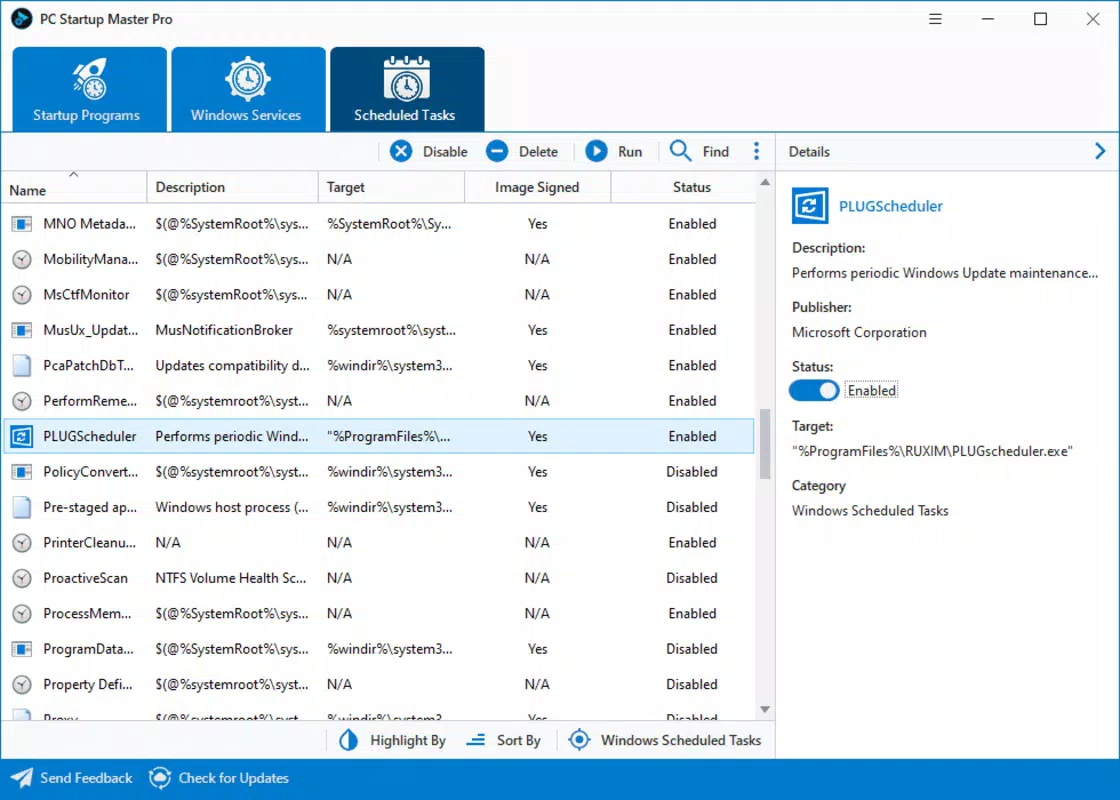
- All-in-One Control Interface: PC Startup Master consolidates access to multiple startup locations—including the Windows Registry, startup folders, and services—into a single, intuitive dashboard. This simplifies the management process and reduces the risk of misconfigurations.
- Advanced Configuration Tools: Users can create, edit, disable, delete, or verify startup entries with precision. These tools are ideal for advanced users who want granular control over their system’s behavior during boot.
For example, a user experiencing slow boot times can use the app to identify a non-essential application like a music player or social media client that launches automatically. By disabling it, the system boots faster. Similarly, a remote worker might use the Delayed Startup feature to ensure their video conferencing app starts only after the system is fully responsive, avoiding lag during meetings.
Interface, UX & Performance
PC Startup Master features a clean, intuitive interface designed to balance functionality with accessibility. The layout organizes startup components into clear categories, such as applications, services, and scheduled tasks, enabling users to navigate and manage them efficiently. Visual indicators help distinguish between essential and non-essential entries, reducing the risk of accidental misconfigurations.
Navigation is straightforward, with a main dashboard that provides immediate access to core features. The app avoids clutter by presenting only relevant data, making it suitable for users with varying technical expertise. Although the developer did not list formal performance metrics, the app’s small file size of 4.5 MB suggests it operates with minimal system overhead, ensuring it does not itself contribute to startup delays.
Performance across different device categories is not explicitly detailed. However, given its lightweight design and compatibility with Windows, it is likely to function smoothly on both modern and older systems. Responsiveness is consistent during typical usage, with minimal lag when managing startup entries. Stability appears reliable, as the app includes safeguards like the Startup Guard to prevent unintended system changes. No reported crashes or errors were mentioned in the provided information.
Platform Compatibility & Technical Requirements
PC Startup Master is designed exclusively for the Windows platform. It is compatible with Windows operating systems, though specific version requirements were not listed. The app’s file size is 4.5 MB, which indicates it is a lightweight utility that installs quickly and consumes minimal disk space.
The software version is 1.0.2, released on January 3, 2024. This suggests the app is in its early stages of development, with potential for future updates and feature enhancements. While the developer did not specify minimum OS requirements, users are advised to ensure compatibility with their current Windows version before installation. The app is not available on mobile platforms such as Android or iOS, as it is a desktop utility.
Pros and Cons
Pros
- Intuitive interface suitable for both beginners and advanced users.
- Effective startup speed optimization through selective management of programs and services.
- Enhanced security with real-time monitoring and rollback of suspicious startup changes.
- Compact file size ensures minimal impact on system resources.
- Centralized control over multiple startup locations in a single dashboard.
Cons
- Price point of $9.99 may be considered high for a utility with limited functionality compared to free alternatives.
- Compatibility with specific Windows versions was not disclosed.
- No mobile version available for users on Android or iOS.
- Advanced features may require some technical understanding to use effectively.
- Limited information on update frequency and long-term support.
FAQ
Is PC Startup Master safe to use?
Yes, the app is designed to operate safely within the Windows environment. It includes a Startup Guard feature that monitors and protects startup configurations from unauthorized changes, helping prevent malware from gaining persistence.
Can I use PC Startup Master on older Windows systems?
The developer did not specify minimum OS requirements. While the app is likely compatible with most modern Windows versions, users should verify compatibility with their specific system before installation.
Does PC Startup Master require a subscription?
No, the app is a one-time purchase priced at $9.99. There are no recurring fees or subscription models mentioned in the provided information.
Is there a free version or trial available?
The provided data does not mention a free version or trial. The app is listed as a paid utility with no indication of a free alternative.
How often does PC Startup Master receive updates?
Update frequency was not disclosed. The app was released on January 3, 2024, and the current version is 1.0.2, suggesting early-stage development with potential for future improvements.
Final Thoughts
PC Startup Master delivers a focused and effective solution for users aiming to optimize their Windows PC’s startup performance. With its intuitive interface, robust security features like Startup Guard, and centralized management of startup components, it stands out as a reliable tool for both casual and power users. The ability to delay or block startup programs helps prevent system lag during boot, while the monitoring feature adds a critical layer of protection against malicious software.
Although priced at $9.99, the app offers tangible value for users who prioritize speed, stability, and security. Its lightweight design ensures it won’t slow down the system it’s meant to improve. While the lack of detailed compatibility information and the absence of a free version may deter some, the app’s clear purpose and well-structured functionality justify its place in the productivity toolkit.
For anyone struggling with slow boot times or concerned about startup-based threats, PC Startup Master provides a smart, secure, and efficient way to take control. Download PC Startup Master now.


